def hierarchical_rag(query, pdf_path, chunk_size=1000, chunk_overlap=200,
                     k_summaries=3, k_chunks=5, regenerate=False):
    """
    完成分层检索增强生成 (RAG) 管道。

    参数:
        query (str):用户查询。pdf_path
        (str):PDF 文档的路径。chunk_size
        (int):要处理的文本块的大小。chunk_overlap
        (int):连续块之间的重叠。k_summaries
        (int):要检索的顶级摘要的数量。k_chunks
        (int):每个摘要要检索的详细块数。regenerate
        (bool):是否重新处理文档。

    返回:
        dict:包含查询、生成的响应、检索到的块
              以及摘要和详细块的计数。
    """
    # 定义用于缓存摘要和详细向量存储的文件名
    summary_store_file = f"{os.path.basename(pdf_path)}_summary_store.pkl"
    detailed_store_file = f"{os.path.basename(pdf_path)}_detailed_store.pkl"

    # 如果需要重新生成或缓存文件丢失,则处理文档,
    if regenerate or not os.path.exists(summary_store_file) or not os.path.exists(detailed_store_file):
        print("Processing document and creating vector stores...")
        summary_store, detailed_store = process_document_hierarchically(pdf_path, chunk_size, chunk_overlap)

        # Save processed stores for future use
        with open(summary_store_file, 'wb') as f:
            pickle.dump(summary_store, f)
        with open(detailed_store_file, 'wb') as f:
            pickle.dump(detailed_store, f)
    else:
        # Load existing vector stores from cache
        print("Loading existing vector stores...")
        with open(summary_store_file, 'rb') as f:
            summary_store = pickle.load(f)
        with open(detailed_store_file, 'rb') as f:
            detailed_store = pickle.load(f)

    # 使用分层搜索检索相关块
    retrieved_chunks = retrieve_hierarchically(query, summary_store, detailed_store, k_summaries, k_chunks)

    # 根据检索到的块生成响应
    response = generate_response(query, retrieved_chunks)

    # 返回带有元数据的结果
    return {
        "query": query,
        "response": response,
        "retrieved_chunks": retrieved_chunks,
        "summary_count": len(summary_store.texts),
        "detailed_count": len(detailed_store.texts)
    }
此hierarchical_rag函数处理两阶段检索过程:
- 首先,它搜索
summary_store以找到最相关的摘要。 - 然后,它会搜索
detailed_store运行分层 RAG 管道,但只在属于顶部摘要的块内进行搜索。这比搜索所有详细块要高效得多。
该函数还有一个regenerate参数,用于创建新的向量存储或使用现有的向量存储。
让我们用它来回答我们的查询并进行评估:
# Run the hierarchical RAG pipeline
result = hierarchical_rag(query, pdf_path)
我们检索并生成响应。最后,让我们看看评估分数:
# Evaluate.
evaluation_prompt = f"User Query: {query}\nAI Response:\n{result['response']}\nTrue Response: {reference_answer}\n{evaluate_system_prompt}"
evaluation_response = generate_response(evaluate_system_prompt, evaluation_prompt)
print(evaluation_response.choices[0].message.content)

### OUTPUT
0.84
我们的分数是 0.84
分层检索提供了迄今为止最好的分数。
我们获得了搜索摘要的速度和搜索较小块的精度,以及通过了解每个块属于哪个部分而获得的附加上下文。这就是为什么它通常是表现最佳的 RAG 策略。
15-HyDE
到目前为止,我们一直直接嵌入用户的查询或其转换版本。HyDE(假设文档嵌入)采用了不同的方法。它不是嵌入查询,而是嵌入回答查询的假设文档。
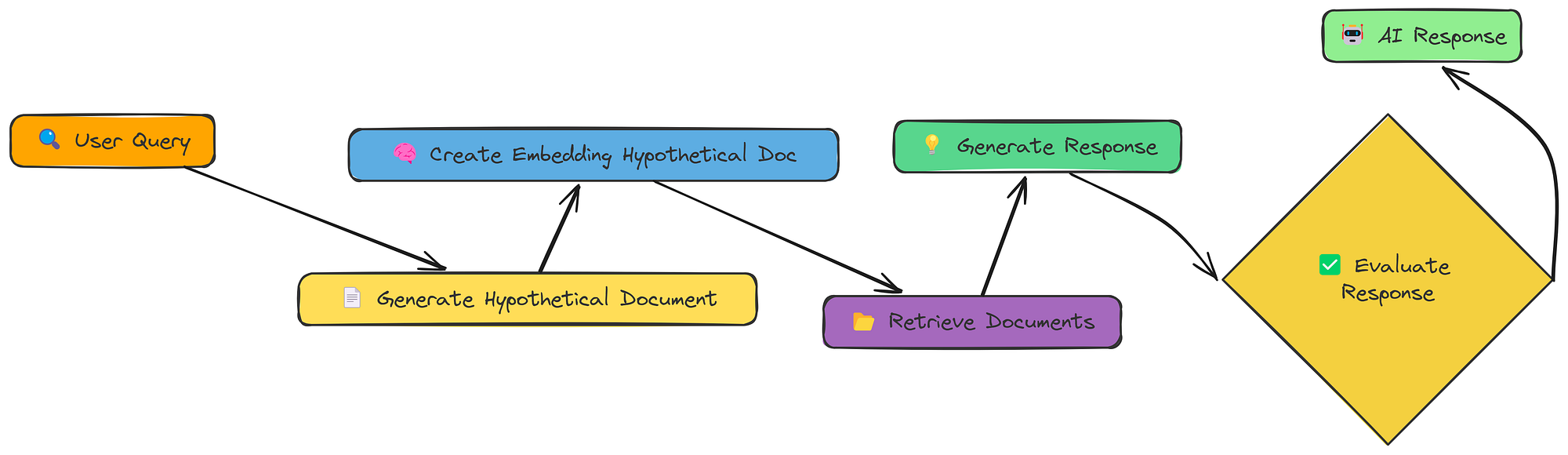
HyDE 工作流程(由Fareed Khan创建)
流程如下:
- 生成假设文档:可以使用 LLM 创建一个回答查询的文档(如果存在)。
- 嵌入假设文档:创建此假设而不是文档的嵌入,原始查询。
- 检索:查找与嵌入相似的文档。
- 生成:使用文档(而不是假设的文档!)来回答查询。
其理念是,完整文档(即使是假设文档)比简短查询具有更丰富的语义表示。这有助于弥合查询和嵌入空间中的文档之间的差距。
让我们看看它是如何工作的。首先,我们需要一个函数来生成那个假设的文档。
我们generate_hypothetical_document这样做:
def generate_hypothetical_document(query, desired_length=1000):
    """
    生成一个假设文档来回答查询。
    """
    """您是专家文档创建者。
    给定一个问题,生成一份详细的文档来直接回答这个问题。
    文档长度应约为{desired_length}个字符,并提供对该问题的深入、
    翔实的答案。写作时要像这份文件来自
    该主题的权威来源一样。包括具体的细节、事实和解释。
    不要提到这是一份假设文件 - 只需直接写出内容即可。"""
    # 定义系统提示以指导模型如何生成文档
    system_prompt = f"""You are an expert document creator.
    Given a question, generate a detailed document that would directly answer this question.
    The document should be approximately {desired_length} characters long and provide an in-depth,
    informative answer to the question. Write as if this document is from an authoritative source
    on the subject. Include specific details, facts, and explanations.
    Do not mention that this is a hypothetical document - just write the content directly."""

    # 使用查询定义用户提示
    user_prompt = f"Question: {query}\n\nGenerate a document that fully answers this question:"

    # 向 OpenAI API 发出请求以生成假设文档
    response = client.chat.completions.create(
        model="meta-llama/Llama-3.2-3B-Instruct",  # Specify the model to use
        messages=[
            {"role": "system", "content": system_prompt},  # System message to guide the assistant
            {"role": "user", "content": user_prompt}  # User message with the query
        ],
        temperature=0.1  # Set the temperature for response generation
    )

    # 返回生成的文档内容
    return response.choices[0].message.content
该函数接受查询并使用 LLM 来创建回答该查询的文档。
现在,让我们将其全部放在 hyde_rag 函数中:
def hyde_rag(query, vector_store, k=5, should_generate_response=True):
    """
    使用假设文档嵌入执行 RAG。
    """
    print(f"\n=== Processing query with HyDE: {query} ===\n")

    # 步骤 1:生成一个回答查询的假设文档
    print("Generating hypothetical document...")
    hypothetical_doc = generate_hypothetical_document(query)
    print(f"Generated hypothetical document of {len(hypothetical_doc)} characters")

    # 步骤 2:为假设文档创建嵌入
    print("Creating embedding for hypothetical document...")
    hypothetical_embedding = create_embeddings([hypothetical_doc])[0]

    # 步骤 3:根据假设文档检索相似的块
    print(f"Retrieving {k} most similar chunks...")
    retrieved_chunks = vector_store.similarity_search(hypothetical_embedding, k=k)

    # 准备结果字典
    results = {
        "query": query,
        "hypothetical_document": hypothetical_doc,
        "retrieved_chunks": retrieved_chunks
    }

    # 步骤 4:如果要求,生成响应
    if should_generate_response:
        print("Generating final response...")
        response = generate_response(query, retrieved_chunks)
        results["response"] = response

    return results
hyde_rag 函数现在:
- 生成假设文档。
- 创建该文档的嵌入(不是查询!)。
- 使用嵌入进行检索。
- 像以前一样生成响应。
让我们运行它并查看生成的响应:
# Run HyDE RAG
hyde_result = hyde_rag(query, vector_store)

# Evaluate.
evaluation_prompt = f"User Query: {query}\nAI Response:\n{hyde_result['response']}\nTrue Response: {reference_answer}\n{evaluate_system_prompt}"
evaluation_response = generate_response(evaluate_system_prompt, evaluation_prompt)
print(evaluation_response.choices[0].message.content)

### OUTPUT
0.5
我们的评估分数在0.5左右。
HyDE 的想法很聪明,但并不总是效果更好。在这种情况下,假设的文档可能与我们实际的文档集合的方向略有不同,导致检索结果相关性较低。
这里的关键教训是,没有单一的“最佳” RAG 技术。不同的方法对不同的查询和不同的数据效果更好。
16-融合
我们已经看到,不同的检索方法各有千秋。向量搜索擅长语义相似性,而关键字搜索擅长查找精确匹配。如果我们能将它们结合起来会怎么样?这就是 Fusion RAG 背后的想法。
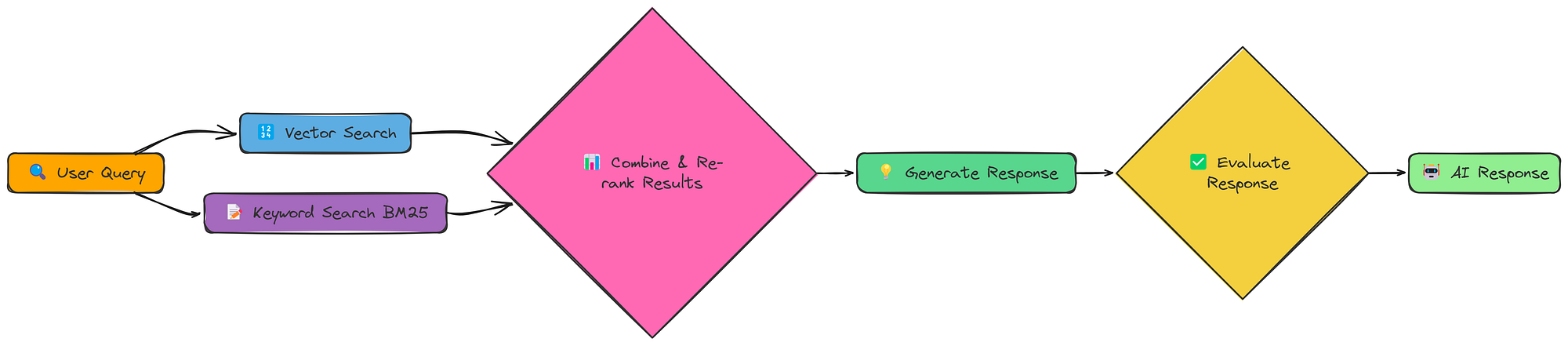
Fusion RAG 工作流程(由Fareed Khan创建)
Fusion RAG不会选择一种检索方法,而是同时执行两种方法,然后合并并重新排列结果。这使我们能够同时捕获语义含义和精确的关键字匹配。
我们实现的核心是 fusion_retrieval 函数。此函数执行基于向量和基于 BM25 的检索,对每个分数进行规范化,使用加权公式将它们组合起来,然后根据组合分数对文档进行排名。
以下是融合检索的函数:
import numpy as np

def fusion_retrieval(query, chunks, vector_store, bm25_index, k=5, alpha=0.5):
    """通过结合基于向量和 BM25 的搜索结果执行融合检索。"""

    # 为查询生成嵌入
    query_embedding = create_embeddings(query)

    # 执行向量搜索并将结果存储在字典中(索引 -> 相似度得分)
     vector_results = {
        r[ "metadata" ][ "index" ]: r[ "similarity" ]
        for r in vector_store.similarity_search_with_scores(query_embedding, len (chunks))
    }

    # 执行 BM25 搜索并将结果存储在字典中(索引 -> BM25 得分)
     bm25_results = {
        r[ "metadata" ][ "index" ]: r[ "bm25_score" ]
        for r in bm25_search(bm25_index, chunks, query, len (chunks))
    }

    # 从向量存储中检索所有文档
    all_docs = vector_store.get_all_documents()

    # 使用向量和 BM25 分数的加权和计算每个文档的综合分数
    scores = [
        (i, alpha * vector_results.get(i, 0 ) + ( 1 - alpha) * bm25_results.get(i, 0 ))
        for i in  range ( len (all_docs))
    ]

    # 按综合分数降序对文档进行排序,并保留前 k 个结果
    top_docs = sorted (scores, key= lambda x: x[ 1 ], reverse= True )[:k]

    # 返回包含文本、元数据和综合分数的前 k 个文档
    return [
        {"text": all_docs[i]["text"], "metadata": all_docs[i]["metadata"], "score": s}
        for i, s in top_docs
    ]
它结合了两种方法的优点:
- 向量搜索:使用我们现有的 create_embeddings 和 SimpleVectorStore 实现语义相似性。
- BM25 搜索:使用 BM25 算法(一种标准信息检索技术)实现基于关键字的搜索。
- 分数组合:将两种方法的分数结合起来,给出一个统一的排名。
让我们运行完整的管道并生成响应:
# 首先,处理文档以创建块、向量存储和 BM25 索引
chunks,vector_store,bm25_index = process_document(pdf_path)

# 使用融合检索运行 RAG
 fusion_result = answer_with_fusion_rag(query,chunks,vector_store,bm25_index)
print (fusion_result[ "response" ])

# 评估。evaluate_prompt
 = f"User Query: {query} \nAI Response:\n {fusion_result[ 'response' ]} \nTrue Response: {reference_answer} \n {evaluate_system_prompt} "
 evaluate_response =generate_response(evaluate_system_prompt,evaluation_prompt)
print (evaluation_response.choices[ 0 ].message.content)

### OUTPUT
Evaluation score for AI Response is 0.83
最终得分为0.83。
Fusion RAG 通常能给我们带来显著的提升,因为它结合了不同检索方法的优势。
这就像有两个专家一起工作,一个擅长理解查询的含义,另一个擅长找到完全匹配。
17-多模型
到目前为止,我们只处理文本。但很多信息都被困在图像、图表和示意图中。多模态 RAG 旨在解锁这些信息,并利用它们来改进我们的响应。
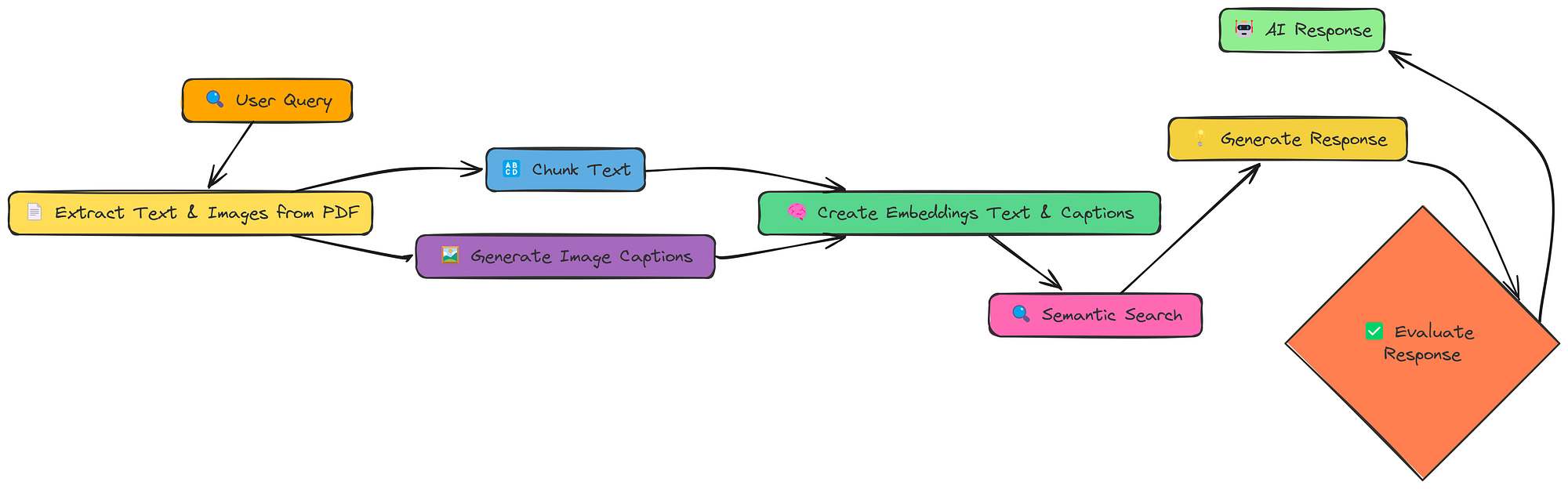
多模型工作流(由Fareed Khan创建)
这里的关键变化是:
- 提取文本和图像:我们从 PDF 中提取文本和
- 生成图像标题:我们使用 LLM(具体来说,具有**视觉功能的模型)为每个图像生成文本描述(标题)。
- 创建嵌入(文本和标题):我们为文本块标题创建嵌入。
- 嵌入模型:在此笔记本中,我们使用 BAAI/bge-en-icl 嵌入模型。
- LLM 模型:为了生成响应和图像标题,我们将使用 llava-hf/llava-1.5–7b-hf 模型。
这样,我们的向量存储就包含文本和视觉信息,并且我们可以跨两种模式进行搜索。
这里我们定义process_document函数:
def process_document(pdf_path, chunk_size=1000, chunk_overlap=200):
    """
    为多模态 RAG 处理文档。

    """
    # 为提取的图像创建目录
    image_dir = "extracted_images"
     os.makedirs(image_dir, exist_ok= True )

    # 从 PDF 中提取文本和图像
    text_data, image_paths = extract_content_from_pdf(pdf_path, image_dir)

    # 对提取的文本进行分
    块 chunked_text = chunk_text(text_data, chunk_size, chunk_overlap)

    # 处理提取的图像以生成标题
    image_data = process_images(image_paths)

    # 组合所有内容项(文本块和图像标题)
     all_items = chunked_text + image_data

    # 提取用于嵌入的内容
    contents = [item[ "content" ] for item in all_items]

    # 为所有内容创建嵌入
    print ( "Creating embeddings for all content..." )
    embeddings = create_embeddings(contents)

    # 构建向量存储并添加带有嵌入的项目
    vector_store = MultiModalVectorStore()
    vector_store.add_items(all_items, embeddings)

    # 准备包含文本块和图像标题计数的文档信息
    doc_info = {
        “text_count” : len (chunked_text),
        “image_count” : len (image_data),
        “total_items” : len (all_items),
    }

    # 打印添加项目的摘要
    print(f"Added {len(all_items)} items to vector store ({len(chunked_text)} text chunks, {len(image_data)} image captions)")

    # 返回向量存储和文档信息
    return vector_store, doc_info
该函数处理图像提取和字幕以及的创建MultiModalVectorStore。
我们假设图像字幕的效果相当好。(在实际场景中,您需要仔细评估字幕的质量)。
现在,让我们通过查询将所有内容整合在一起:
# 处理文档以创建向量存储。我们为此创建了一个新的 PDF
 pdf_path = "data/attention_is_all_you_need.pdf"
 vector_store, doc_info = process_document(pdf_path)

# 运行多模态 RAG 管道。这与之前非常相似!
 result = query_multimodal_rag(query,vector_store)

# 评估。evaluation_prompt
evaluation_prompt = f"User Query: {query}\nAI Response:\n{result['response']}\nTrue Response: {reference_answer}\n{evaluate_system_prompt}"
evaluation_response = generate_response(evaluate_system_prompt, evaluation_prompt)
print(evaluation_response.choices[0].message.content)

### OUTPUT
0.79
我们的得分约为 0.79。
多模态 RAG 具有非常强大的潜力,尤其是在图像包含关键信息的文档中。然而,它目前的表现还不及我们目前所知的其他技术。
18-Crag
到目前为止,我们的 RAG 系统相对被动。它们检索信息并生成响应。但是,如果检索到的信息不好怎么办?如果信息不相关、不完整,甚至自相矛盾怎么办?矫正 RAG(CRAG)可以正面解决这个问题。
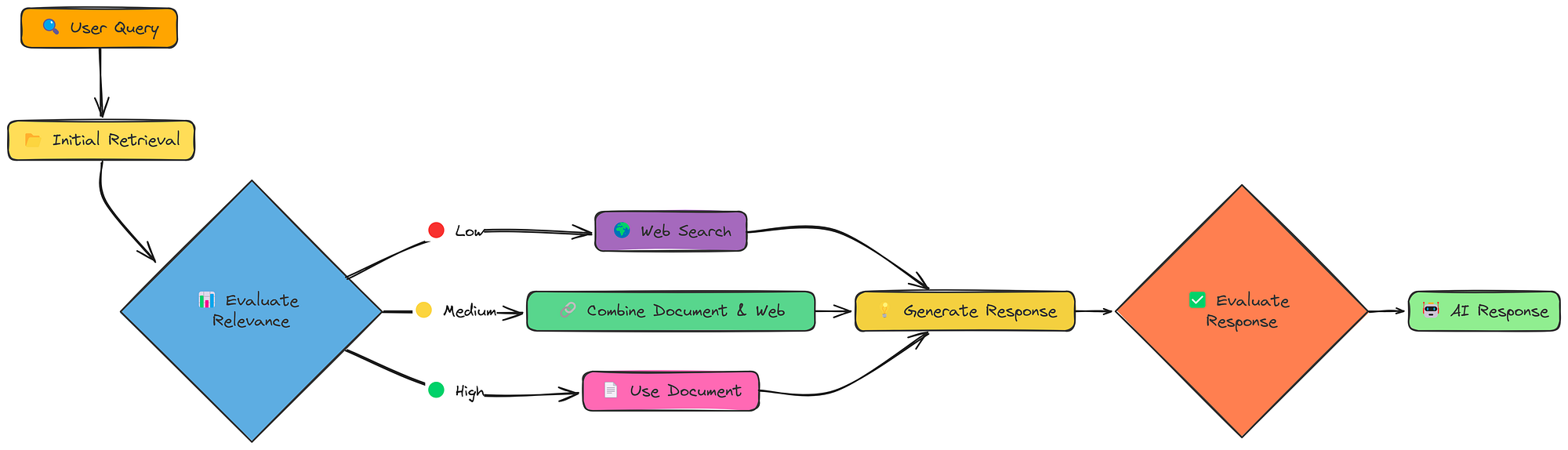
CRAG 工作流程(由Fareed Khan创建)
CRAG 增加了一个关键步骤:评估。初始检索之后,它会检查检索到的文档的相关性。而且,至关重要的是,它会根据评估结果制定不同的策略:
- 高相关性:如果检索到的文档良好,则照常进行。
- 相关性低:如果检索到的文档不好,则返回网络搜索!
- 中等相关性:如果文档没有问题,则结合文档和网络的信息。
这种“纠正”机制使 CRAG 比标准 RAG 更加稳健。它并非只是期盼最好的结果,而是主动检查并进行调整。
让我们看看这在实践中是如何运作的。我们将使用一个函数rag_with_compression来调用它。
# Run CRAG
crag_result = rag_with_compression(pdf_path, query, compression_type="selective")
这个单一函数调用做了很多事情:
- 初始检索:照常检索文档。
- 相关性评估:对每个文档与查询的相关性进行评分。
- 决策:决定是否使用文档、进行网络搜索或两者结合。
- 响应生成:使用所选的知识源生成响应。
和往常一样,评价如下:
# Evaluate.
evaluation_prompt = f"User Query: {query}\nAI Response:\n{crag_result['response']}\nTrue Response: {reference_answer}\n{evaluate_system_prompt}"
evaluation_response = generate_response(evaluate_system_prompt, evaluation_prompt)
print(evaluation_response.choices[0].message.content)

### OUTPUT ###
0.824
我们的目标分数是 0.824 左右。
CRAG检测和纠正检索失败的能力使其比标准 RAG 更加可靠。
通过在必要时动态切换到网络搜索,它可以处理更广泛的查询并避免陷入不相关或不充分的信息。
这种“自我纠正”能力是迈向更强大、更值得信赖的 RAG 系统的重要一步。
结论
通过对18种RAG技术的全面测试与比较,我们可以得出以下关键结论:
- 自适应RAG(Adaptive RAG)以0.86的评分成为最佳技术,其动态切换检索策略的能力使其在处理各类查询时表现出色
- 分层索引(0.84)、融合RAG(0.83)和CRAG(0.824)紧随其后,也展现了良好的性能
- 简单RAG虽然实现容易,但效果有限,需要结合更先进的技术才能满足复杂应用需求
- 选择合适的RAG技术应根据具体应用场景、数据特性和性能需求综合考虑
这些技术的实现代码都可以在GitHub仓库中找到,为开发者提供了宝贵的学习和实践资源。
经过测试的 18 种 RAG 技术代表了提高检索质量的多种方法,从简单的分块策略到自适应 RAG 等高级方法。
虽然简单 RAG 提供了基线,但分层索引(0.84)、融合(0.83)和 CRAG(0.824)等更复杂的方法通过解决检索挑战的不同方面,表现明显优于它。
自适应 RAG 通过根据查询类型智能地选择检索策略而成为最佳表现者(0.86),这表明具有上下文感知能力的灵活系统能够针对各种信息需求提供最佳结果。
发表回复